
How to Setup and Verify Your Business on ChatGPT
 6 Minutes Read

Not long ago, being "found online" meant one thing: showing up on Google. That is changing quickly. More and more people now ask AI assistants directly for recommendations, whether that is a corporate trainer in their city, a supplier for their next project, or a service provider they can trust.
So at TIC, we asked ourselves a simple question: when someone asks an AI assistant about what we do, does it actually know who we are?
That question led us to OpenAI's business listing feature. As an AEO strategist at TIC, I have claimed our business, "The Information Company", on ChatGPT, and the process turned out to be far simpler than I expected. In this article, I will walk you through exactly what I did, step by step, so that you can do the same for your business.
What you get once your business is verified:
Before we get into the steps, here is what is waiting for you on the other side. Once your business is verified, you get a dedicated business dashboard with three main sections:
- Overview: a snapshot of your business profile and its current status.
- Agent builder: where you set up the business agent that chats with customers on your behalf.
- Products: where you can upload your product or service catalogue so customers can browse what you offer.
Scroll a little further and you will find an insights panel. It includes a Mentions section, which shows how often your business comes up, and a Top 5 discovery topics section, which shows the subjects through which people are discovering you. For anyone who cares about visibility, this is genuinely valuable data.
Now, let us look at how to get there.
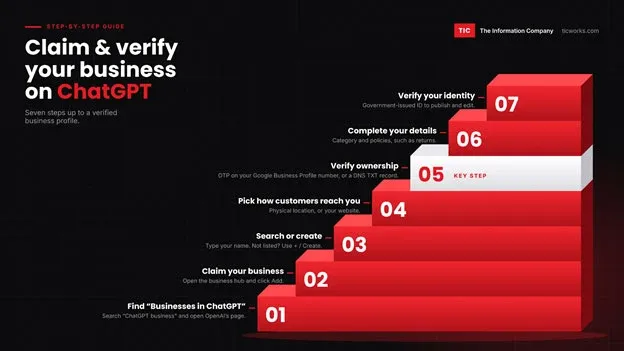
Step 1: Find "Businesses in ChatGPT"
Start with a quick Google search for "ChatGPT business". Scroll down the results and you will see an option for Businesses in ChatGPT on OpenAI's website. Click on it.
This takes you to a landing page built to help businesses reach new customers through AI-powered search.
Step 2: Click "Claim your business"
- The interface here is clean and simple. Click Claim your business.
- You will be taken to your business hub, where you can add a business. Click Add to begin.
Step 3: Search for your business, or create it
- Type in your business name. If your business already appears in the results, select it.
- If it does not appear, do not worry. Simply click the + / Create option to create a new listing under the name you entered.
Step 4: Choose how customers reach you
There are two options:
- At a physical location: customers visit your store, restaurant, office or another location.
- Through a website: customers buy from your website or marketplace.
Choose the one that best describes your business.
Step 5: Verify that the business is yours
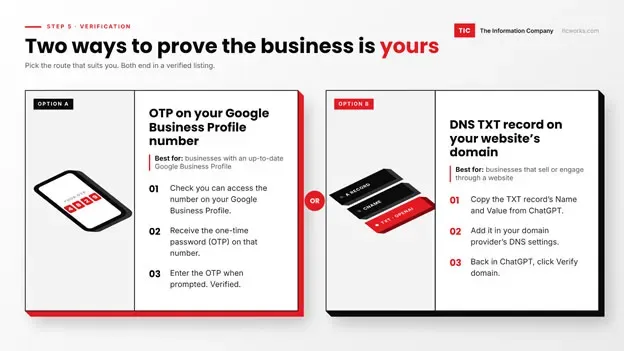
Next, you need to show that you genuinely own or represent this business. There are two ways to do this, so pick whichever suits you.
Option A: OTP on your Google Business Profile phone number
If your business has a Google Business Profile (GMB), you can verify your claim with a one-time password (OTP) sent to the phone number registered on that profile. Enter the OTP when prompted, and your business is verified.
This is usually the quickest route, especially for businesses with a physical location and an up-to-date Google Business Profile.
Tip: Make sure you have access to the phone number listed on your Google Business Profile before you start. If that number is outdated, update it on your profile first, or use Option B instead.
Option B: Add a DNS TXT record to your website's domain
If you chose the website option, enter your business website and click Continue. You will then be asked to prove that you own the domain. This route is slightly more technical, but still very manageable.
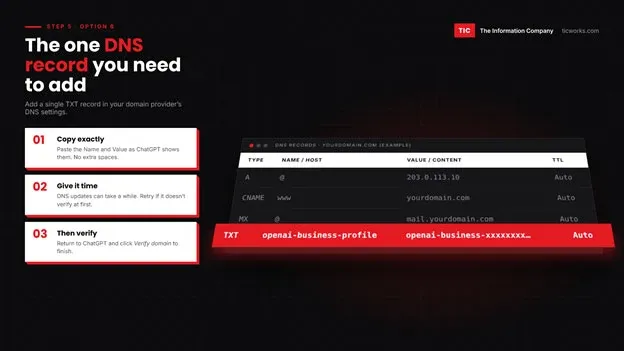
- You will be shown a TXT record to add. Note down the Name/Host (it begins with openai-business-profile) and the Value/Content (a long verification code).
- Log in to your domain provider, whichever company you bought your domain from or manage your DNS with (for example GoDaddy, Hostinger or Cloudflare), and open its DNS settings.
- Add a new TXT record, paste in the Name and Value exactly as they are shown, and save it.
- Return to the verification screen and click Verify domain.
Tip: DNS changes can take a little while to take effect. If verification does not succeed immediately, give it some time and try again. Also make sure you have copied the value exactly, with no extra spaces.
Step 6: Complete your business details
Once the domain is verified, fill in the remaining details of your business profile, such as your category and your policies (for example, your return policy). The more complete and accurate this information is, the better AI assistants can represent your business to customers.
Step 7: Verify your identity with a government-issued ID
There is one final step. To keep your business secure, you will be asked to verify your identity with a government-issued ID. This is required before you can edit your business information or publish your business agent.
Upload a valid government ID linked to you or your business, and you are done. Your business dashboard, with Overview, Agent builder, Products and insights, is now yours to use.
Quick Recap:
- Search for and open OpenAI's official business listing page.
- Click Claim your business, then Add.
- Search for your business, or create it if it is not listed.
- Choose how customers reach you: a physical location or a website.
- Verify ownership with an OTP on your Google Business Profile phone number, or a DNS TXT record on your website's domain.
- Complete your business details.
- Verify your identity with a government-issued ID.
Conclusion: make sure ChatGPT knows your business
The way customers discover businesses is shifting, and AI assistants are fast becoming the new front door. Claiming and verifying your business on ChatGPT takes very little time, yet it gives you a verified presence, a business agent that can speak to customers, and insights into how people are finding you.
If you have not done it yet, set aside fifteen minutes today and claim your business. Your next customer may already be asking ChatGPT about you.
Want to be found where your customers are asking?
Claiming your business on ChatGPT is a strong first step, but being visible in AI answers takes more than a listing. At TIC (The Information Company), we help businesses understand how AI assistants such as ChatGPT see their brand, and what it takes to be the answer those assistants recommend. From AEO audits and competitor benchmarking to structuring your website content so that AI can read, trust and cite it, we work alongside you to make your business visible on AI search.
If you would like to know how visible your business is on AI today, or need a hand getting it verified and optimised, get in touch with the TIC team. We would be glad to help.